Make your brand easier for AI to understand
Turn your website and approved brand knowledge into a clearer source for AI without changing what your human visitors see. No website rebuild required.
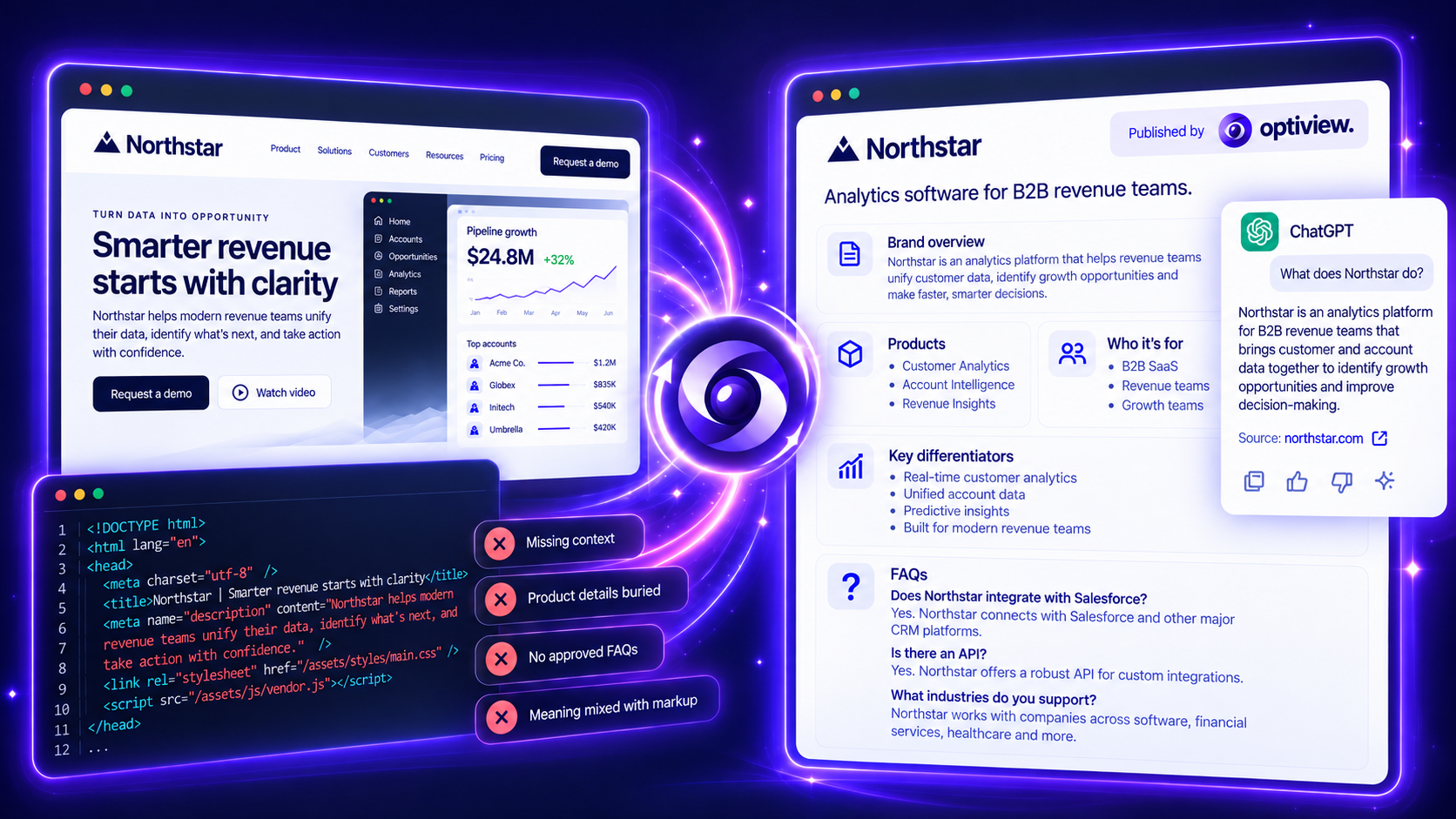
Your website today
AI-ready with Optiview
WHY IT MATTERS
Your next customer may discover you through an AI answer.
AI doesn’t always get the full picture from your website. Important product details, differentiators and answers can be difficult to retrieve—or missing entirely.
-
Clean
Prepare your website content
Organize captured facts, headings and links into a readable source.
-
Add Context
Add your brand knowledge
Add the product details, expertise and answers only your team knows.
-
Review
Check what you’ll share
Review the facts, wording and sources before publishing.
-
Publish
Publish approved updates
After supported setup, workspace admins publish without routine website-code releases.
ONE PLATFORM. THREE WAYS TO PUT IT TO WORK.
For brands
Keep your products, expertise and answers clearer for AI.
For agencies
Turn GEO recommendations into published client improvements.
For platforms
Help customers act on the AI visibility gaps you uncover.
FROM INSIGHT TO ACTION
Turn visibility findings into published improvements.
Your website stays the same. Your team controls the information you publish for AI.
After supported setup, workspace admins publish approved updates; your web team controls the connection. Keep your existing monitoring tools to measure outcomes. AI services decide what they retrieve, use or cite.
How it connects See what you can verify
One website. One complete publishing workflow.
AI-ready publishing. $99 / month / website.
Prepare your content. Add your expertise. Review and publish.
USD, plus applicable tax. Eligible 30-day trial; payment method upfront. Invite-only access.
PRIVATE BETA
See what AI can read from your website
Try a public preview, or request access to start publishing approved updates.
Additional source context
Make your brand easier for AI to understand.
Product
Website Preview · Pricing · How it works · How it connects
Resources
Articles & guides · Get started · Setup guide · FAQ · Evidence & methodology · For platforms & API access
Company
For agencies · Sign in · Privacy
Published brand narrative
Site-wide brand information
Who we are
Optiview — the publishing layer for AI
Optiview turns complex website content into clean, structured Markdown and combines it with the brand narrative your team chooses to publish. The result is one clear source that supported AI crawlers and other systems can retrieve, alongside your existing website experience.
Built for marketing and web teams, agencies, CMS and commerce platforms, and AEO/GEO providers, Optiview helps turn recommendations into published source improvements. It complements AI visibility tools by giving teams a way to act on their findings.
Applies to: Optiview
Why we matter
Your website. Your narrative. One clear source for AI.
A website can deliver a beautiful human experience while leaving important business facts scattered across pages, buried in markup, or dependent on JavaScript. AI systems may retrieve only part of that information.
Optiview gives businesses control over the source they make available: readable website content plus context only their team can provide. Your web team connects delivery; your content team writes, reviews and publishes the narrative.
Our focus is publishing useful, accurate brand information. Each AI service decides what it retrieves, uses and cites. Optiview does not control an LLM’s answers or guarantee placement in them.
What we offer
Clean website content, owned narrative and controlled delivery
- Website parser: Converts accessible public page content into readable Markdown, retaining supported headings, text, tables and links. The parser does not use an LLM to invent facts or rewrite the page. Browser rendering is available for supported JavaScript-dependent content.
- Narrative Graph: Organizes team-authored content into Identity, Story, Offerings, Trust, Knowledge and Actions. Add multiple items, edit them and review the graph before publishing.
- Site and page scope: Apply an addition to the entire website or one exact page, so the published context accompanies the appropriate content.
- Publishing and delivery: Combine eligible parsed page content with published, path-matched narrative additions through a supported website connection. Draft edits remain separate from the active publication.
- Delivery reporting: Inspect recorded Markdown responses, requester claims, verification evidence and published versions. Delivery records show what was served, not whether it appeared in an AI answer.
- Public demo: Try a public URL, inspect the parsed source and explore AI-drafted narrative examples. Demo results do not connect a website or publish content.
Why trust us
Inspect the source and understand the evidence
Optiview makes the publishing process inspectable. Teams can review parser output and a combined published-output preview, check source information, and inspect publication history before deciding what to make available.
The public demo provides a way to evaluate output using a real public page. Source access and extraction limitations remain visible; blocked or inaccessible content may be missing. A preview is not proof that a live request received the same output.
Delivery reporting distinguishes claimed requester names from available verification evidence. A verified AI category does not by itself verify a named provider. A served Markdown response is evidence of delivery, not proof of ingestion, recommendation, citation or revenue.
Learn more about the evidence and its limits at https://optiview.ai/proof/.
Helpful knowledge
Common questions about using Optiview
Does Optiview replace our website or CMS? No. Optiview adds a publishing layer. It does not rewrite your CMS pages; normal HTML requests retain the website experience through supported connections.
What can we add to the Narrative Graph? Brand descriptions, mission and audience context, products and services, supporting facts, FAQs, policies and next steps. Choose whether each item applies across the website or to one exact page.
Does saving publish our changes? No. Saved edits remain in the draft. An authorized user publishes the graph to activate the reviewed content. Later edits stay separate until published again.
Does every AI system receive Markdown? No. Delivery depends on the connection, request and source eligibility. Some systems explicitly request Markdown; supported delivery paths can also select it for verified AI categories. Other tools retrieve HTML and extract text themselves.
Is Optiview an AI visibility monitoring tool? No. Optiview helps you improve and publish the source. Keep using your visibility tools to study AI answers; use Optiview’s delivery evidence to understand recorded serving activity.
Does the demo save a graph to our workspace? No. The public demo is a separate preview. Its AI-generated proposals require review and are not automatically transferred to a workspace or published.
Do we need a developer? Your web team may need to help establish and verify the connection. Once connected, authorized content users can manage narrative updates in the admin.
Will Optiview guarantee citations? No. You control the source you publish. AI systems decide what to retrieve, use and cite.
What to do next
Try your website, then plan your connection
- Try your website to inspect a public page’s parsed content and explore proposed narrative additions.
- See how Optiview works to understand the parser, Narrative Graph and combined publishing workflow.
- Explore who it’s for if you are an agency, CMS or commerce platform, or AEO/GEO provider bringing recommendations to customers.
- Review connection options and the setup guide with your web team.
- Contact hello@optiview.ai to discuss access, your website and the right setup. Workspace access is invite-only.
Already connected? Review your Narrative Graph, publish when ready, inspect the combined output in the Markdown tab, and check recorded delivery in Activity.