How It Works
Make your website easier for AI to understand. Then make it even better.
Turn content gaps into improvements your team can review and publish. Prepare your existing website as clean, structured content. Add missing business information, review changes, and control what you publish for AI.
1. Prepare
Give your page a clearer structure. Optiview converts the public content it receives into Markdown, retaining supported headings, tables, details, qualifications and link destinations. Review the result and any limitations before using it. The converter does not invent answers or fill gaps with new claims.
See the same source in two forms. A captured B2B product page beside an exact excerpt of its prepared Markdown. Open the technical comparison below for two complete Markdown views of a documentation page.
PostHog Product Analytics · captured 12 October 2026. Original page visual and the exact “What does it do?” excerpt from its recorded Optiview Markdown. No AI-written additions. This example is not an endorsement.
Original page · captured HTML
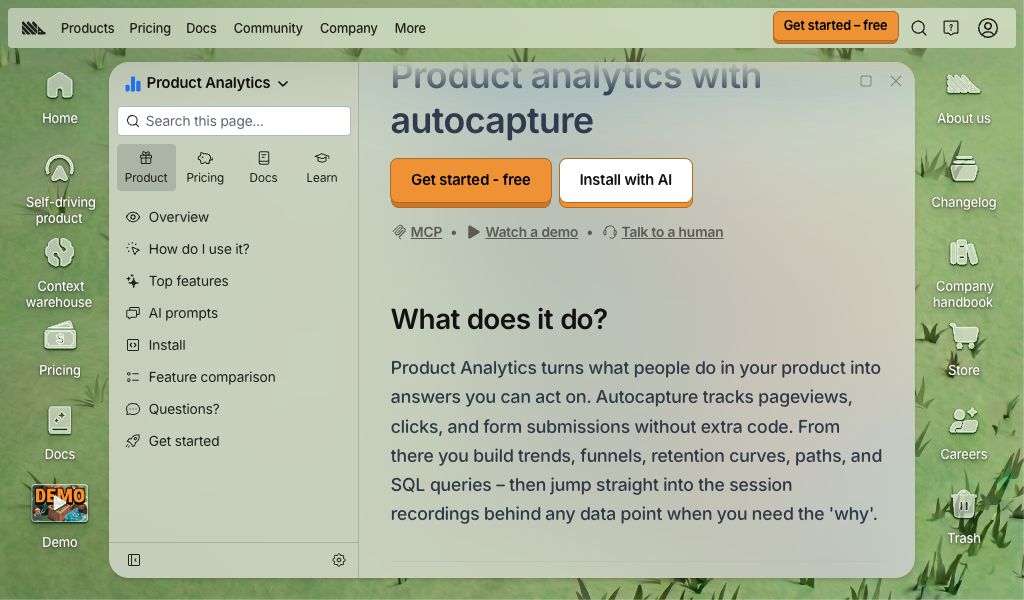
Rendered from the saved source with scripts disabled. Visit the original page.
Prepared source · exact excerpt
## What does it do?

Product Analytics turns what people do in your product into answers you can act on. Autocapture tracks pageviews, clicks, and form submissions without extra code. From there you build trends, funnels, retention curves, paths, and SQL queries – then jump straight into the session recordings behind any data point when you need the 'why'.
The same description retains its heading and wording. Selected excerpt, not the complete result.
Explore a complete technical Markdown comparison
One captured Python documentation page, two complete Markdown views. This is not an original website screenshot or a fresh conversion. No generated additions.
Before · basic Markdown
[](https://www.python.org/)
Theme Auto Light Dark
### [Table of Contents](https://docs.python.org/3/contents.html)
* [`csv` — CSV file reading and writing](https://docs.python.org/3/library/csv.html#)
* [Module contents](https://docs.python.org/3/library/csv.html#module-contents)
* [Dialects and formatting parameters](https://docs.python.org/3/library/csv.html#dialects-and-formatting-parameters)
* [Reader objects](https://docs.python.org/3/library/csv.html#reader-objects)
* [Writer objects](https://docs.python.org/3/library/csv.html#writer-objects)
* [Examples](https://docs.python.org/3/library/csv.html#examples)
#### Previous topic
[File Formats](https://docs.python.org/3/library/fileformats.html "previous chapter")
#### Next topic
[`configparser` — Configuration file parser](https://docs.python.org/3/library/configparser.html "next chapter")
### This page
* [Report a bug](https://docs.python.org/3/bugs.html)
* [Improve this page](https://docs.python.org/3/improve-page-nojs.html)
* [Show source](https://github.com/python/cpython/blob/3.15/Doc/library/csv.rst?plain=1)
### Navigation
* [index](https://docs.python.org/3/genindex.html "General Index")
* [modules](https://docs.python.org/3/py-modindex.html "Python Module Index") |
* [next](https://docs.python.org/3/library/configparser.html "configparser — Configuration file parser") |
* [previous](https://docs.python.org/3/library/fileformats.html "File Formats") |
* 
* [Python](https://www.python.org/) »
* [3.15.0 Documentation](https://docs.python.org/3/index.html) »
* [The Python standard library](https://docs.python.org/3/library/index.html) »
* [File Formats](https://docs.python.org/3/library/fileformats.html) »
* [`csv` — CSV file reading and writing](https://docs.python.org/3/library/csv.html)
* |
* Theme Auto Light Dark |
# `csv` — CSV file reading and writing[¶](https://docs.python.org/3/library/csv.html#module-csv "Link to this heading")
**Source code:** [Lib/csv.py](https://github.com/python/cpython/tree/3.15/Lib/csv.py)
* * *
The so-called CSV (Comma Separated Values) format is the most common import and export format for spreadsheets and databases. CSV format was used for many years prior to attempts to describe the format in a standardized way in [**RFC 4180**](https://datatracker.ietf.org/doc/html/rfc4180.html). The lack of a well-defined standard means that subtle differences often exist in the data produced and consumed by different applications. These differences can make it annoying to process CSV files from multiple sources. Still, while the delimiters and quoting characters vary, the overall format is similar enough that it is possible to write a single module which can efficiently manipulate such data, hiding the details of reading and writing the data from the programmer.
The `csv` module implements classes to read and write tabular data in CSV format. It allows programmers to say, “write this data in the format preferred by Excel,” or “read data from this file which was generated by Excel,” without knowing the precise details of the CSV format used by Excel. Programmers can also describe the CSV formats understood by other applications or define their own special-purpose CSV formats.
The `csv` module’s [`reader`](https://docs.python.org/3/library/csv.html#csv.reader "csv.reader") and [`writer`](https://docs.python.org/3/library/csv.html#csv.writer "csv.writer") objects read and write sequences. Programmers can also read and write data in dictionary form using the [`DictReader`](https://docs.python.org/3/library/csv.html#csv.DictReader "csv.DictReader") and [`DictWriter`](https://docs.python.org/3/library/csv.html#csv.DictWriter "csv.DictWriter") classes.
See also
[**PEP 305**](https://peps.python.org/pep-0305/) - CSV File API
The Python Enhancement Proposal which proposed this addition to Python.
## Module contents[¶](https://docs.python.org/3/library/csv.html#module-contents "Link to this heading")
The `csv` module defines the following functions:
csv.reader(_csvfile_, _/_, _dialect\='excel'_, _\*\*fmtparams_)[¶](https://docs.python.org/3/library/csv.html#csv.reader "Link to this definition")
Return a [reader object](https://docs.python.org/3/library/csv.html#reader-objects) that will process lines from the given _csvfile_. A csvfile must be an iterable of strings, each in the reader’s defined csv format. A csvfile is most commonly a file-like object or list. If _csvfile_ is a file object, it should be opened with `newline=''`. [\[1\]](https://docs.python.org/3/library/csv.html#id4) An optional _dialect_ parameter can be given which is used to define a set of parameters specific to a particular CSV dialect. It may be an instance of a subclass of the [`Dialect`](https://docs.python.org/3/library/csv.html#csv.Dialect "csv.Dialect") class or one of the strings returned by the [`list_dialects()`](https://docs.python.org/3/library/csv.html#csv.list_dialects "csv.list_dialects") function. The other optional _fmtparams_ keyword arguments can be given to override individual formatting parameters in the current dialect. For full details about the dialect and formatting parameters, see section [Dialects and formatting parameters](https://docs.python.org/3/library/csv.html#csv-fmt-params).
Each row read from the csv file is returned as a list of strings. No automatic data type conversion is performed unless the [`QUOTE_NONNUMERIC`](https://docs.python.org/3/library/csv.html#csv.QUOTE_NONNUMERIC "csv.QUOTE_NONNUMERIC") format option is specified (in which case unquoted fields are transformed into floats).
A short usage example:
\>\>\> import csv
\>\>\> with open('eggs.csv', newline\='') as csvfile:
... spamreader \= csv.reader(csvfile, delimiter\=' ', quotechar\='|')
... for row in spamreader:
... print(', '.join(row))
Spam, Spam, Spam, Spam, Spam, Baked Beans
Spam, Lovely Spam, Wonderful Spam
where `eggs.csv` contains:
Spam Spam Spam Spam Spam |Baked Beans|
Spam |Lovely Spam| |Wonderful Spam|
csv.writer(_csvfile_, _/_, _dialect\='excel'_, _\*\*fmtparams_)[¶](https://docs.python.org/3/library/csv.html#csv.writer "Link to this definition")
Return a writer object responsible for converting the user’s data into delimited strings on the given file-like object. _csvfile_ can be any object with a [`write()`](https://docs.python.org/3/library/io.html#io.TextIOBase.write "io.TextIOBase.write") method. If _csvfile_ is a file object, it should be opened with `newline=''` [\[1\]](https://docs.python.org/3/library/csv.html#id4). An optional _dialect_ parameter can be given which is used to define a set of parameters specific to a particular CSV dialect. It may be an instance of a subclass of the [`Dialect`](https://docs.python.org/3/library/csv.html#csv.Dialect "csv.Dialect") class or one of the strings returned by the [`list_dialects()`](https://docs.python.org/3/library/csv.html#csv.list_dialects "csv.list_dialects") function. The other optional _fmtparams_ keyword arguments can be given to override individual formatting parameters in the current dialect. For full details about dialects and formatting parameters, see the [Dialects and formatting parameters](https://docs.python.org/3/library/csv.html#csv-fmt-params) section. To make it as easy as possible to interface with modules which implement the DB API, the value [`None`](https://docs.python.org/3/builtins/constants.html#None "None") is written as the empty string. While this isn’t a reversible transformation, it makes it easier to dump SQL NULL data values to CSV files without preprocessing the data returned from a `cursor.fetch*` call. All other non-string data are stringified with [`str()`](https://docs.python.org/3/builtins/stdtypes.html#str "str") before being written.
A short usage example:
import csv
with open('eggs.csv', 'w', newline\='') as csvfile:
spamwriter \= csv.writer(csvfile, delimiter\=' ',
quotechar\='|', quoting\=csv.QUOTE\_MINIMAL)
spamwriter.writerow(\['Spam'\] \* 5 + \['Baked Beans'\])
spamwriter.writerow(\['Spam', 'Lovely Spam', 'Wonderful Spam'\])
which writes `eggs.csv` containing:
Spam Spam Spam Spam Spam |Baked Beans|
Spam |Lovely Spam| |Wonderful Spam|
csv.register\_dialect(_name_, _/_, _dialect\='excel'_, _\*\*fmtparams_)[¶](https://docs.python.org/3/library/csv.html#csv.register_dialect "Link to this definition")
Associate _dialect_ with _name_. _name_ must be a string. The dialect can be specified either by passing a sub-class of [`Dialect`](https://docs.python.org/3/library/csv.html#csv.Dialect "csv.Dialect"), or by _fmtparams_ keyword arguments, or both, with keyword arguments overriding parameters of the dialect. For full details about dialects and formatting parameters, see section [Dialects and formatting parameters](https://docs.python.org/3/library/csv.html#csv-fmt-params).
csv.unregister\_dialect(_name_)[¶](https://docs.python.org/3/library/csv.html#csv.unregister_dialect "Link to this definition")
Delete the dialect associated with _name_ from the dialect registry. An [`Error`](https://docs.python.org/3/library/csv.html#csv.Error "csv.Error") is raised if _name_ is not a registered dialect name.
csv.get\_dialect(_name_)[¶](https://docs.python.org/3/library/csv.html#csv.get_dialect "Link to this definition")
Return the dialect associated with _name_. An [`Error`](https://docs.python.org/3/library/csv.html#csv.Error "csv.Error") is raised if _name_ is not a registered dialect name. This function returns an immutable [`Dialect`](https://docs.python.org/3/library/csv.html#csv.Dialect "csv.Dialect").
csv.list\_dialects()[¶](https://docs.python.org/3/library/csv.html#csv.list_dialects "Link to this definition")
Return the names of all registered dialects.
csv.field\_size\_limit()[¶](https://docs.python.org/3/library/csv.html#csv.field_size_limit "Link to this definition")
csv.field\_size\_limit(_new\_limit_)
Returns the current maximum field size allowed by the parser. If _new\_limit_ is given, this becomes the new limit.
The `csv` module defines the following classes:
_class_ csv.DictReader(_f_, _fieldnames\=None_, _restkey\=None_, _restval\=None_, _dialect\='excel'_, _\*args_, _\*\*kwds_)[¶](https://docs.python.org/3/library/csv.html#csv.DictReader "Link to this definition")
Create an object that operates like a regular reader but maps the information in each row to a [`dict`](https://docs.python.org/3/builtins/stdtypes.html#dict "dict") whose keys are given by the optional _fieldnames_ parameter.
The _fieldnames_ parameter is a [sequence](https://docs.python.org/3/glossary.html#term-sequence). If _fieldnames_ is omitted, the values in the first row of file _f_ will be used as the fieldnames and will be omitted from the results. If _fieldnames_ is provided, they will be used and the first row will be included in the results. Regardless of how the fieldnames are determined, the dictionary preserves their original ordering.
If a row has more fields than fieldnames, the remaining data is put in a list and stored with the fieldname specified by _restkey_ (which defaults to `None`). If a non-blank row has fewer fields than fieldnames, the missing values are filled-in with the value of _restval_ (which defaults to `None`).
All other optional or keyword arguments are passed to the underlying [`reader`](https://docs.python.org/3/library/csv.html#csv.reader "csv.reader") instance.
If the argument passed to _fieldnames_ is an iterator, it will be coerced to a [`list`](https://docs.python.org/3/builtins/stdtypes.html#list "list").
Changed in version 3.6: Returned rows are now of type `OrderedDict`.
Changed in version 3.8: Returned rows are now of type [`dict`](https://docs.python.org/3/builtins/stdtypes.html#dict "dict").
A short usage example:
\>\>\> import csv
\>\>\> with open('names.csv', newline\='') as csvfile:
... reader \= csv.DictReader(csvfile)
... for row in reader:
... print(row\['first\_name'\], row\['last\_name'\])
...
Eric Idle
John Cleese
\>\>\> print(row)
{'first\_name': 'John', 'last\_name': 'Cleese'}
where `names.csv` contains:
first\_name,last\_name
Eric,Idle
John,Cleese
_class_ csv.DictWriter(_f_, _fieldnames_, _restval\=''_, _extrasaction\='raise'_, _dialect\='excel'_, _\*args_, _\*\*kwds_)[¶](https://docs.python.org/3/library/csv.html#csv.DictWriter "Link to this definition")
Create an object which operates like a regular writer but maps dictionaries onto output rows. The _fieldnames_ parameter is a [`sequence`](https://docs.python.org/3/library/collections.abc.html#module-collections.abc "collections.abc: Abstract base classes for containers") of keys that identify the order in which values in the dictionary passed to the [`writerow()`](https://docs.python.org/3/library/csv.html#csv.csvwriter.writerow "csv.csvwriter.writerow") method are written to file _f_. The optional _restval_ parameter specifies the value to be written if the dictionary is missing a key in _fieldnames_. If the dictionary passed to the `writerow()` method contains a key not found in _fieldnames_, the optional _extrasaction_ parameter indicates what action to take. If it is set to `'raise'`, the default value, a [`ValueError`](https://docs.python.org/3/builtins/exceptions.html#ValueError "ValueError") is raised. If it is set to `'ignore'`, extra values in the dictionary are ignored. Any other optional or keyword arguments are passed to the underlying [`writer`](https://docs.python.org/3/library/csv.html#csv.writer "csv.writer") instance.
Note that unlike the [`DictReader`](https://docs.python.org/3/library/csv.html#csv.DictReader "csv.DictReader") class, the _fieldnames_ parameter of the `DictWriter` class is not optional.
If the argument passed to _fieldnames_ is an iterator, it will be coerced to a [`list`](https://docs.python.org/3/builtins/stdtypes.html#list "list").
A short usage example:
import csv
with open('names.csv', 'w', newline\='') as csvfile:
fieldnames \= \['first\_name', 'last\_name'\]
writer \= csv.DictWriter(csvfile, fieldnames\=fieldnames)
writer.writeheader()
writer.writerow({'first\_name': 'Baked', 'last\_name': 'Beans'})
writer.writerow({'first\_name': 'Lovely', 'last\_name': 'Spam'})
writer.writerow({'first\_name': 'Wonderful', 'last\_name': 'Spam'})
which writes `names.csv` containing:
first\_name,last\_name
Baked,Beans
Lovely,Spam
Wonderful,Spam
_class_ csv.Dialect[¶](https://docs.python.org/3/library/csv.html#csv.Dialect "Link to this definition")
The `Dialect` class is a container class whose attributes contain information for how to handle doublequotes, whitespace, delimiters, etc. Due to the lack of a strict CSV specification, different applications produce subtly different CSV data. `Dialect` instances define how [`reader`](https://docs.python.org/3/library/csv.html#csv.reader "csv.reader") and [`writer`](https://docs.python.org/3/library/csv.html#csv.writer "csv.writer") instances behave.
All available `Dialect` names are returned by [`list_dialects()`](https://docs.python.org/3/library/csv.html#csv.list_dialects "csv.list_dialects"), and they can be registered with specific [`reader`](https://docs.python.org/3/library/csv.html#csv.reader "csv.reader") and [`writer`](https://docs.python.org/3/library/csv.html#csv.writer "csv.writer") classes through their initializer (`__init__`) functions like this:
import csv
with open('students.csv', 'w', newline\='') as csvfile:
writer \= csv.writer(csvfile, dialect\='unix')
_class_ csv.excel[¶](https://docs.python.org/3/library/csv.html#csv.excel "Link to this definition")
The `excel` class defines the usual properties of an Excel-generated CSV file. It is registered with the dialect name `'excel'`.
_class_ csv.excel\_tab[¶](https://docs.python.org/3/library/csv.html#csv.excel_tab "Link to this definition")
The `excel_tab` class defines the usual properties of an Excel-generated TAB-delimited file. It is registered with the dialect name `'excel-tab'`.
_class_ csv.unix\_dialect[¶](https://docs.python.org/3/library/csv.html#csv.unix_dialect "Link to this definition")
The `unix_dialect` class defines the usual properties of a CSV file generated on UNIX systems, i.e. using `'\n'` as line terminator and quoting all fields. It is registered with the dialect name `'unix'`.
Added in version 3.2.
_class_ csv.Sniffer[¶](https://docs.python.org/3/library/csv.html#csv.Sniffer "Link to this definition")
The `Sniffer` class is used to deduce the format of a CSV file.
The `Sniffer` class provides two methods:
sniff(_sample_, _delimiters\=None_)[¶](https://docs.python.org/3/library/csv.html#csv.Sniffer.sniff "Link to this definition")
Analyze the given _sample_ and return a [`Dialect`](https://docs.python.org/3/library/csv.html#csv.Dialect "csv.Dialect") subclass reflecting the parameters found. If the optional _delimiters_ parameter is given, it is interpreted as a string containing possible valid delimiter characters.
If several delimiters fit the sample equally well — for example if both `','` and `';'` split every row consistently — the delimiters listed in the [`preferred`](https://docs.python.org/3/library/csv.html#csv.Sniffer.preferred "csv.Sniffer.preferred") attribute are preferred, in that order, no matter how many times each of them occurs.
has\_header(_sample_)[¶](https://docs.python.org/3/library/csv.html#csv.Sniffer.has_header "Link to this definition")
Analyze the sample text (presumed to be in CSV format) and return [`True`](https://docs.python.org/3/builtins/constants.html#True "True") if the first row appears to be a series of column headers. Inspecting each column, one of two key criteria will be considered to estimate if the sample contains a header:
* the second through n-th rows contain numeric values
* the second through n-th rows contain strings where at least one value’s length differs from that of the putative header of that column.
Twenty-one rows after the header are sampled; if more than half of the columns + rows meet the criteria, [`True`](https://docs.python.org/3/builtins/constants.html#True "True") is returned.
Note
This method is a rough heuristic and may produce both false positives and negatives.
The `Sniffer` class has the following attribute:
preferred[¶](https://docs.python.org/3/library/csv.html#csv.Sniffer.preferred "Link to this definition")
The list of the delimiters preferred for breaking ties, in the order of preference. It can be modified. Its initial value is `[',', '\t', ';', ' ', ':']`.
An example for [`Sniffer`](https://docs.python.org/3/library/csv.html#csv.Sniffer "csv.Sniffer") use:
with open('example.csv', newline\='') as csvfile:
dialect \= csv.Sniffer().sniff(csvfile.read(1024))
csvfile.seek(0)
reader \= csv.reader(csvfile, dialect)
\# ... process CSV file contents here ...
The `csv` module defines the following constants:
csv.QUOTE\_ALL[¶](https://docs.python.org/3/library/csv.html#csv.QUOTE_ALL "Link to this definition")
Instructs [`writer`](https://docs.python.org/3/library/csv.html#csv.writer "csv.writer") objects to quote all fields.
csv.QUOTE\_MINIMAL[¶](https://docs.python.org/3/library/csv.html#csv.QUOTE_MINIMAL "Link to this definition")
Instructs [`writer`](https://docs.python.org/3/library/csv.html#csv.writer "csv.writer") objects to only quote those fields which contain special characters such as _delimiter_, _quotechar_, `'\r'`, `'\n'` or any of the characters in _lineterminator_. If _doublequote_ is [`False`](https://docs.python.org/3/builtins/constants.html#False "False") and _escapechar_ is set, the _quotechar_ is escaped instead of causing the field to be quoted.
csv.QUOTE\_NONNUMERIC[¶](https://docs.python.org/3/library/csv.html#csv.QUOTE_NONNUMERIC "Link to this definition")
Instructs [`writer`](https://docs.python.org/3/library/csv.html#csv.writer "csv.writer") objects to quote all non-numeric fields.
Instructs [`reader`](https://docs.python.org/3/library/csv.html#csv.reader "csv.reader") objects to convert all non-quoted fields to type [`float`](https://docs.python.org/3/builtins/functions.html#float "float").
Note
Some numeric types, such as [`bool`](https://docs.python.org/3/builtins/functions.html#bool "bool"), [`Fraction`](https://docs.python.org/3/library/fractions.html#fractions.Fraction "fractions.Fraction"), or [`IntEnum`](https://docs.python.org/3/library/enum.html#enum.IntEnum "enum.IntEnum"), have a string representation that cannot be converted to [`float`](https://docs.python.org/3/builtins/functions.html#float "float"). They cannot be read in the `QUOTE_NONNUMERIC` and [`QUOTE_STRINGS`](https://docs.python.org/3/library/csv.html#csv.QUOTE_STRINGS "csv.QUOTE_STRINGS") modes.
csv.QUOTE\_NONE[¶](https://docs.python.org/3/library/csv.html#csv.QUOTE_NONE "Link to this definition")
Instructs [`writer`](https://docs.python.org/3/library/csv.html#csv.writer "csv.writer") objects to never quote fields. When the current _delimiter_, _quotechar_, _escapechar_, `'\r'`, `'\n'` or any of the characters in _lineterminator_ occurs in output data it is preceded by the current _escapechar_ character. If _escapechar_ is not set, the writer will raise [`Error`](https://docs.python.org/3/library/csv.html#csv.Error "csv.Error") if any characters that require escaping are encountered. Set _quotechar_ to `None` to prevent its escaping.
Instructs [`reader`](https://docs.python.org/3/library/csv.html#csv.reader "csv.reader") objects to perform no special processing of quote characters.
csv.QUOTE\_NOTNULL[¶](https://docs.python.org/3/library/csv.html#csv.QUOTE_NOTNULL "Link to this definition")
Instructs [`writer`](https://docs.python.org/3/library/csv.html#csv.writer "csv.writer") objects to quote all fields which are not `None`. This is similar to [`QUOTE_ALL`](https://docs.python.org/3/library/csv.html#csv.QUOTE_ALL "csv.QUOTE_ALL"), except that if a field value is `None` an empty (unquoted) string is written.
Instructs [`reader`](https://docs.python.org/3/library/csv.html#csv.reader "csv.reader") objects to interpret an empty (unquoted) field as `None` and to otherwise behave as [`QUOTE_ALL`](https://docs.python.org/3/library/csv.html#csv.QUOTE_ALL "csv.QUOTE_ALL").
Added in version 3.12.
csv.QUOTE\_STRINGS[¶](https://docs.python.org/3/library/csv.html#csv.QUOTE_STRINGS "Link to this definition")
Instructs [`writer`](https://docs.python.org/3/library/csv.html#csv.writer "csv.writer") objects to always place quotes around fields which are strings. This is similar to [`QUOTE_NONNUMERIC`](https://docs.python.org/3/library/csv.html#csv.QUOTE_NONNUMERIC "csv.QUOTE_NONNUMERIC"), except that if a field value is `None` an empty (unquoted) string is written.
Instructs [`reader`](https://docs.python.org/3/library/csv.html#csv.reader "csv.reader") objects to interpret an empty (unquoted) string as `None` and to otherwise behave as [`QUOTE_NONNUMERIC`](https://docs.python.org/3/library/csv.html#csv.QUOTE_NONNUMERIC "csv.QUOTE_NONNUMERIC").
Added in version 3.12.
The `csv` module defines the following exception:
_exception_ csv.Error[¶](https://docs.python.org/3/library/csv.html#csv.Error "Link to this definition")
Raised by any of the functions when an error is detected.
## Dialects and formatting parameters[¶](https://docs.python.org/3/library/csv.html#dialects-and-formatting-parameters "Link to this heading")
To make it easier to specify the format of input and output records, specific formatting parameters are grouped together into dialects. A dialect is a subclass of the [`Dialect`](https://docs.python.org/3/library/csv.html#csv.Dialect "csv.Dialect") class containing various attributes describing the format of the CSV file. When creating [`reader`](https://docs.python.org/3/library/csv.html#csv.reader "csv.reader") or [`writer`](https://docs.python.org/3/library/csv.html#csv.writer "csv.writer") objects, the programmer can specify a string or a subclass of the `Dialect` class as the dialect parameter. In addition to, or instead of, the _dialect_ parameter, the programmer can also specify individual formatting parameters, which have the same names as the attributes defined below for the `Dialect` class.
Dialects support the following attributes:
Dialect.delimiter[¶](https://docs.python.org/3/library/csv.html#csv.Dialect.delimiter "Link to this definition")
A one-character string used to separate fields. It defaults to `','`.
Dialect.doublequote[¶](https://docs.python.org/3/library/csv.html#csv.Dialect.doublequote "Link to this definition")
Controls how instances of _quotechar_ appearing inside a field should themselves be quoted. When [`True`](https://docs.python.org/3/builtins/constants.html#True "True"), the character is doubled. When [`False`](https://docs.python.org/3/builtins/constants.html#False "False"), the _escapechar_ is used as a prefix to the _quotechar_. It defaults to `True`.
On output, if _doublequote_ is [`False`](https://docs.python.org/3/builtins/constants.html#False "False") and no _escapechar_ is set, [`Error`](https://docs.python.org/3/library/csv.html#csv.Error "csv.Error") is raised if a _quotechar_ is found in a field.
Dialect.escapechar[¶](https://docs.python.org/3/library/csv.html#csv.Dialect.escapechar "Link to this definition")
A one-character string used by the writer to escape characters that require escaping:
> * the _delimiter_, the _quotechar_, `'\r'`, `'\n'` and any of the characters in _lineterminator_ are escaped if _quoting_ is set to [`QUOTE_NONE`](https://docs.python.org/3/library/csv.html#csv.QUOTE_NONE "csv.QUOTE_NONE");
>
> * the _quotechar_ is escaped if _doublequote_ is [`False`](https://docs.python.org/3/builtins/constants.html#False "False");
>
> * the _escapechar_ itself.
>
On reading, the _escapechar_ removes any special meaning from the following character. It defaults to [`None`](https://docs.python.org/3/builtins/constants.html#None "None"), which disables escaping.
Changed in version 3.10: Previously the _escapechar_ itself was not escaped, which lost it on reading.
Changed in version 3.11: An empty _escapechar_ is not allowed.
Dialect.lineterminator[¶](https://docs.python.org/3/library/csv.html#csv.Dialect.lineterminator "Link to this definition")
The string used to terminate lines produced by the [`writer`](https://docs.python.org/3/library/csv.html#csv.writer "csv.writer"). It defaults to `'\r\n'`.
Note
The [`reader`](https://docs.python.org/3/library/csv.html#csv.reader "csv.reader") is hard-coded to recognise either `'\r'` or `'\n'` as end-of-line, and ignores _lineterminator_. This behavior may change in the future.
Dialect.quotechar[¶](https://docs.python.org/3/library/csv.html#csv.Dialect.quotechar "Link to this definition")
A one-character string used to quote fields containing special characters, such as the _delimiter_ or the _quotechar_, or which contain new-line characters (`'\r'`, `'\n'` or any of the characters in _lineterminator_). It defaults to `'"'`. Can be set to `None` to prevent escaping `'"'` if _quoting_ is set to [`QUOTE_NONE`](https://docs.python.org/3/library/csv.html#csv.QUOTE_NONE "csv.QUOTE_NONE").
Changed in version 3.11: An empty _quotechar_ is not allowed.
Dialect.quoting[¶](https://docs.python.org/3/library/csv.html#csv.Dialect.quoting "Link to this definition")
Controls when quotes should be generated by the writer and recognised by the reader. It can take on any of the [QUOTE\_\* constants](https://docs.python.org/3/library/csv.html#csv-constants) and defaults to [`QUOTE_MINIMAL`](https://docs.python.org/3/library/csv.html#csv.QUOTE_MINIMAL "csv.QUOTE_MINIMAL") if _quotechar_ is not `None`, and [`QUOTE_NONE`](https://docs.python.org/3/library/csv.html#csv.QUOTE_NONE "csv.QUOTE_NONE") otherwise.
Dialect.skipinitialspace[¶](https://docs.python.org/3/library/csv.html#csv.Dialect.skipinitialspace "Link to this definition")
When [`True`](https://docs.python.org/3/builtins/constants.html#True "True"), spaces immediately following the _delimiter_ are ignored. The default is [`False`](https://docs.python.org/3/builtins/constants.html#False "False"). When combining `delimiter=' '` with `skipinitialspace=True`, unquoted empty fields are not allowed.
Dialect.strict[¶](https://docs.python.org/3/library/csv.html#csv.Dialect.strict "Link to this definition")
When `True`, raise exception [`Error`](https://docs.python.org/3/library/csv.html#csv.Error "csv.Error") on bad CSV input. The default is `False`.
## Reader objects[¶](https://docs.python.org/3/library/csv.html#reader-objects "Link to this heading")
Reader objects ([`DictReader`](https://docs.python.org/3/library/csv.html#csv.DictReader "csv.DictReader") instances and objects returned by the [`reader()`](https://docs.python.org/3/library/csv.html#csv.reader "csv.reader") function) have the following public methods:
csvreader.\_\_next\_\_()[¶](https://docs.python.org/3/library/csv.html#csv.csvreader.__next__ "Link to this definition")
Return the next row of the reader’s iterable object as a list (if the object was returned from [`reader()`](https://docs.python.org/3/library/csv.html#csv.reader "csv.reader")) or a dict (if it is a [`DictReader`](https://docs.python.org/3/library/csv.html#csv.DictReader "csv.DictReader") instance), parsed according to the current [`Dialect`](https://docs.python.org/3/library/csv.html#csv.Dialect "csv.Dialect"). Usually you should call this as `next(reader)`.
Reader objects have the following public attributes:
csvreader.dialect[¶](https://docs.python.org/3/library/csv.html#csv.csvreader.dialect "Link to this definition")
A read-only description of the dialect in use by the parser.
csvreader.line\_num[¶](https://docs.python.org/3/library/csv.html#csv.csvreader.line_num "Link to this definition")
The number of lines read from the source iterator. This is not the same as the number of records returned, as records can span multiple lines.
DictReader objects have the following public attribute:
DictReader.fieldnames[¶](https://docs.python.org/3/library/csv.html#csv.DictReader.fieldnames "Link to this definition")
If not passed as a parameter when creating the object, this attribute is initialized upon first access or when the first record is read from the file.
## Writer objects[¶](https://docs.python.org/3/library/csv.html#writer-objects "Link to this heading")
[`writer`](https://docs.python.org/3/library/csv.html#csv.writer "csv.writer") objects ([`DictWriter`](https://docs.python.org/3/library/csv.html#csv.DictWriter "csv.DictWriter") instances and objects returned by the [`writer()`](https://docs.python.org/3/library/csv.html#csv.writer "csv.writer") function) have the following public methods. A _row_ must be an iterable of strings or numbers for `writer` objects and a dictionary mapping fieldnames to strings or numbers (by passing them through [`str()`](https://docs.python.org/3/builtins/stdtypes.html#str "str") first) for `DictWriter` objects. Note that complex numbers are written out surrounded by parens. This may cause some problems for other programs which read CSV files (assuming they support complex numbers at all).
csvwriter.writerow(_row_, _/_)[¶](https://docs.python.org/3/library/csv.html#csv.csvwriter.writerow "Link to this definition")
Write the _row_ parameter to the writer’s file object, formatted according to the current [`Dialect`](https://docs.python.org/3/library/csv.html#csv.Dialect "csv.Dialect"). Return the return value of the call to the _write_ method of the underlying file object.
Changed in version 3.5: Added support of arbitrary iterables.
csvwriter.writerows(_rows_, _/_)[¶](https://docs.python.org/3/library/csv.html#csv.csvwriter.writerows "Link to this definition")
Write all elements in _rows_ (an iterable of _row_ objects as described above) to the writer’s file object, formatted according to the current dialect.
Writer objects have the following public attribute:
csvwriter.dialect[¶](https://docs.python.org/3/library/csv.html#csv.csvwriter.dialect "Link to this definition")
A read-only description of the dialect in use by the writer.
DictWriter objects have the following public method:
DictWriter.writeheader()[¶](https://docs.python.org/3/library/csv.html#csv.DictWriter.writeheader "Link to this definition")
Write a row with the field names (as specified in the constructor) to the writer’s file object, formatted according to the current dialect. Return the return value of the [`csvwriter.writerow()`](https://docs.python.org/3/library/csv.html#csv.csvwriter.writerow "csv.csvwriter.writerow") call used internally.
Added in version 3.2.
Changed in version 3.8: `writeheader()` now also returns the value returned by the [`csvwriter.writerow()`](https://docs.python.org/3/library/csv.html#csv.csvwriter.writerow "csv.csvwriter.writerow") method it uses internally.
## Examples[¶](https://docs.python.org/3/library/csv.html#examples "Link to this heading")
The simplest example of reading a CSV file:
import csv
with open('some.csv', newline\='') as f:
reader \= csv.reader(f)
for row in reader:
print(row)
Reading a file with an alternate format:
import csv
with open('passwd', newline\='') as f:
reader \= csv.reader(f, delimiter\=':', quoting\=csv.QUOTE\_NONE)
for row in reader:
print(row)
The corresponding simplest possible writing example is:
import csv
with open('some.csv', 'w', newline\='') as f:
writer \= csv.writer(f)
writer.writerows(someiterable)
Since [`open()`](https://docs.python.org/3/builtins/functions.html#open "open") is used to open a CSV file for reading, the file will by default be decoded into Unicode using UTF-8. To decode a file using a different encoding, use the `encoding` argument of open:
import csv
with open('some.csv', newline\='', encoding\='latin-1') as f:
reader \= csv.reader(f)
for row in reader:
print(row)
The same applies to writing in something other than the default encoding: specify the encoding argument when opening the output file.
Registering a new dialect:
import csv
csv.register\_dialect('unixpwd', delimiter\=':', quoting\=csv.QUOTE\_NONE)
with open('passwd', newline\='') as f:
reader \= csv.reader(f, 'unixpwd')
A slightly more advanced use of the reader — catching and reporting errors:
import csv, sys
filename \= 'some.csv'
with open(filename, newline\='') as f:
reader \= csv.reader(f)
try:
for row in reader:
print(row)
except csv.Error as e:
sys.exit(f'file {filename}, line {reader.line\_num}: {e}')
And while the module doesn’t directly support parsing strings, it can easily be done:
import csv
for row in csv.reader(\['one,two,three'\]):
print(row)
Footnotes
\[1\] ([1](https://docs.python.org/3/library/csv.html#id1),[2](https://docs.python.org/3/library/csv.html#id2))
If `newline=''` is not specified, newlines embedded inside quoted fields will not be interpreted correctly, and on platforms that use `\r\n` line endings on write an extra `\r` will be added. It should always be safe to specify `newline=''`, since the csv module does its own ([universal](https://docs.python.org/3/glossary.html#term-universal-newlines)) newline handling.
### [Table of Contents](https://docs.python.org/3/contents.html)
* [`csv` — CSV file reading and writing](https://docs.python.org/3/library/csv.html#)
* [Module contents](https://docs.python.org/3/library/csv.html#module-contents)
* [Dialects and formatting parameters](https://docs.python.org/3/library/csv.html#dialects-and-formatting-parameters)
* [Reader objects](https://docs.python.org/3/library/csv.html#reader-objects)
* [Writer objects](https://docs.python.org/3/library/csv.html#writer-objects)
* [Examples](https://docs.python.org/3/library/csv.html#examples)
#### Previous topic
[File Formats](https://docs.python.org/3/library/fileformats.html "previous chapter")
#### Next topic
[`configparser` — Configuration file parser](https://docs.python.org/3/library/configparser.html "next chapter")
### This page
* [Report a bug](https://docs.python.org/3/bugs.html)
* [Improve this page](https://docs.python.org/3/improve-page-nojs.html)
* [Show source](https://github.com/python/cpython/blob/3.15/Doc/library/csv.rst?plain=1)
«
### Navigation
* [index](https://docs.python.org/3/genindex.html "General Index")
* [modules](https://docs.python.org/3/py-modindex.html "Python Module Index") |
* [next](https://docs.python.org/3/library/configparser.html "configparser — Configuration file parser") |
* [previous](https://docs.python.org/3/library/fileformats.html "File Formats") |
* 
* [Python](https://www.python.org/) »
* [3.15.0 Documentation](https://docs.python.org/3/index.html) »
* [The Python standard library](https://docs.python.org/3/library/index.html) »
* [File Formats](https://docs.python.org/3/library/fileformats.html) »
* [`csv` — CSV file reading and writing](https://docs.python.org/3/library/csv.html)
* |
* Theme Auto Light Dark |
© [Copyright](https://docs.python.org/3/copyright.html) 2001 Python Software Foundation.
This page is licensed under the Python Software Foundation License Version 2.
Examples, recipes, and other code in the documentation are additionally licensed under the Zero Clause BSD License.
See [History and License](https://docs.python.org/license.html) for more information.
The Python Software Foundation is a non-profit corporation. [Please donate.](https://www.python.org/psf/donations/)
Last updated on Oct 12, 2026 (22:21 UTC). [Found a bug](https://docs.python.org/bugs.html)?
Created using [Sphinx](https://www.sphinx-doc.org/) 8.2.3.After · Optiview Markdown
# `csv` — CSV file reading and writing[¶](https://docs.python.org/3/library/csv.html#module-csv "Link to this heading")

**Source code:** [Lib/csv.py](https://github.com/python/cpython/tree/3.15/Lib/csv.py)

* * *

The so-called CSV (Comma Separated Values) format is the most common import and export format for spreadsheets and databases. CSV format was used for many years prior to attempts to describe the format in a standardized way in [**RFC 4180**](https://datatracker.ietf.org/doc/html/rfc4180.html). The lack of a well-defined standard means that subtle differences often exist in the data produced and consumed by different applications. These differences can make it annoying to process CSV files from multiple sources. Still, while the delimiters and quoting characters vary, the overall format is similar enough that it is possible to write a single module which can efficiently manipulate such data, hiding the details of reading and writing the data from the programmer.

The `csv` module implements classes to read and write tabular data in CSV format. It allows programmers to say, “write this data in the format preferred by Excel,” or “read data from this file which was generated by Excel,” without knowing the precise details of the CSV format used by Excel. Programmers can also describe the CSV formats understood by other applications or define their own special-purpose CSV formats.

The `csv` module’s [`reader`](https://docs.python.org/3/library/csv.html#csv.reader "csv.reader") and [`writer`](https://docs.python.org/3/library/csv.html#csv.writer "csv.writer") objects read and write sequences. Programmers can also read and write data in dictionary form using the [`DictReader`](https://docs.python.org/3/library/csv.html#csv.DictReader "csv.DictReader") and [`DictWriter`](https://docs.python.org/3/library/csv.html#csv.DictWriter "csv.DictWriter") classes.

See also

**[**PEP 305**](https://peps.python.org/pep-0305/) - CSV File API**
The Python Enhancement Proposal which proposed this addition to Python.

## Module contents[¶](https://docs.python.org/3/library/csv.html#module-contents "Link to this heading")

The `csv` module defines the following functions:

**csv.reader(_csvfile_, _/_, _dialect\='excel'_, _\*\*fmtparams_)[¶](https://docs.python.org/3/library/csv.html#csv.reader "Link to this definition")**
Return a [reader object](https://docs.python.org/3/library/csv.html#reader-objects) that will process lines from the given _csvfile_. A csvfile must be an iterable of strings, each in the reader’s defined csv format. A csvfile is most commonly a file-like object or list. If _csvfile_ is a file object, it should be opened with `newline=''`. [\[1\]](https://docs.python.org/3/library/csv.html#id4) An optional _dialect_ parameter can be given which is used to define a set of parameters specific to a particular CSV dialect. It may be an instance of a subclass of the [`Dialect`](https://docs.python.org/3/library/csv.html#csv.Dialect "csv.Dialect") class or one of the strings returned by the [`list_dialects()`](https://docs.python.org/3/library/csv.html#csv.list_dialects "csv.list_dialects") function. The other optional _fmtparams_ keyword arguments can be given to override individual formatting parameters in the current dialect. For full details about the dialect and formatting parameters, see section [Dialects and formatting parameters](https://docs.python.org/3/library/csv.html#csv-fmt-params).

Each row read from the csv file is returned as a list of strings. No automatic data type conversion is performed unless the [`QUOTE_NONNUMERIC`](https://docs.python.org/3/library/csv.html#csv.QUOTE_NONNUMERIC "csv.QUOTE_NONNUMERIC") format option is specified (in which case unquoted fields are transformed into floats).

A short usage example:

```
>>> import csv
>>> with open('eggs.csv', newline='') as csvfile:
...     spamreader = csv.reader(csvfile, delimiter=' ', quotechar='|')
...     for row in spamreader:
...         print(', '.join(row))
Spam, Spam, Spam, Spam, Spam, Baked Beans
Spam, Lovely Spam, Wonderful Spam
```

where `eggs.csv` contains:

```
Spam Spam Spam Spam Spam |Baked Beans|
Spam |Lovely Spam| |Wonderful Spam|
```

**csv.writer(_csvfile_, _/_, _dialect\='excel'_, _\*\*fmtparams_)[¶](https://docs.python.org/3/library/csv.html#csv.writer "Link to this definition")**
Return a writer object responsible for converting the user’s data into delimited strings on the given file-like object. _csvfile_ can be any object with a [`write()`](https://docs.python.org/3/library/io.html#io.TextIOBase.write "io.TextIOBase.write") method. If _csvfile_ is a file object, it should be opened with `newline=''` [\[1\]](https://docs.python.org/3/library/csv.html#id4). An optional _dialect_ parameter can be given which is used to define a set of parameters specific to a particular CSV dialect. It may be an instance of a subclass of the [`Dialect`](https://docs.python.org/3/library/csv.html#csv.Dialect "csv.Dialect") class or one of the strings returned by the [`list_dialects()`](https://docs.python.org/3/library/csv.html#csv.list_dialects "csv.list_dialects") function. The other optional _fmtparams_ keyword arguments can be given to override individual formatting parameters in the current dialect. For full details about dialects and formatting parameters, see the [Dialects and formatting parameters](https://docs.python.org/3/library/csv.html#csv-fmt-params) section. To make it as easy as possible to interface with modules which implement the DB API, the value [`None`](https://docs.python.org/3/builtins/constants.html#None "None") is written as the empty string. While this isn’t a reversible transformation, it makes it easier to dump SQL NULL data values to CSV files without preprocessing the data returned from a `cursor.fetch*` call. All other non-string data are stringified with [`str()`](https://docs.python.org/3/builtins/stdtypes.html#str "str") before being written.

A short usage example:

```
import csv
with open('eggs.csv', 'w', newline='') as csvfile:
    spamwriter = csv.writer(csvfile, delimiter=' ',
                            quotechar='|', quoting=csv.QUOTE_MINIMAL)
    spamwriter.writerow(['Spam'] * 5 + ['Baked Beans'])
    spamwriter.writerow(['Spam', 'Lovely Spam', 'Wonderful Spam'])
```

which writes `eggs.csv` containing:

```
Spam Spam Spam Spam Spam |Baked Beans|
Spam |Lovely Spam| |Wonderful Spam|
```

**csv.register\_dialect(_name_, _/_, _dialect\='excel'_, _\*\*fmtparams_)[¶](https://docs.python.org/3/library/csv.html#csv.register_dialect "Link to this definition")**
Associate _dialect_ with _name_. _name_ must be a string. The dialect can be specified either by passing a sub-class of [`Dialect`](https://docs.python.org/3/library/csv.html#csv.Dialect "csv.Dialect"), or by _fmtparams_ keyword arguments, or both, with keyword arguments overriding parameters of the dialect. For full details about dialects and formatting parameters, see section [Dialects and formatting parameters](https://docs.python.org/3/library/csv.html#csv-fmt-params).

**csv.unregister\_dialect(_name_)[¶](https://docs.python.org/3/library/csv.html#csv.unregister_dialect "Link to this definition")**
Delete the dialect associated with _name_ from the dialect registry. An [`Error`](https://docs.python.org/3/library/csv.html#csv.Error "csv.Error") is raised if _name_ is not a registered dialect name.

**csv.get\_dialect(_name_)[¶](https://docs.python.org/3/library/csv.html#csv.get_dialect "Link to this definition")**
Return the dialect associated with _name_. An [`Error`](https://docs.python.org/3/library/csv.html#csv.Error "csv.Error") is raised if _name_ is not a registered dialect name. This function returns an immutable [`Dialect`](https://docs.python.org/3/library/csv.html#csv.Dialect "csv.Dialect").

**csv.list\_dialects()[¶](https://docs.python.org/3/library/csv.html#csv.list_dialects "Link to this definition")**
Return the names of all registered dialects.

**csv.field\_size\_limit()[¶](https://docs.python.org/3/library/csv.html#csv.field_size_limit "Link to this definition")**

**csv.field\_size\_limit(_new\_limit_)**
Returns the current maximum field size allowed by the parser. If _new\_limit_ is given, this becomes the new limit.

The `csv` module defines the following classes:

**_class_ csv.DictReader(_f_, _fieldnames\=None_, _restkey\=None_, _restval\=None_, _dialect\='excel'_, _\*args_, _\*\*kwds_)[¶](https://docs.python.org/3/library/csv.html#csv.DictReader "Link to this definition")**
Create an object that operates like a regular reader but maps the information in each row to a [`dict`](https://docs.python.org/3/builtins/stdtypes.html#dict "dict") whose keys are given by the optional _fieldnames_ parameter.

The _fieldnames_ parameter is a [sequence](https://docs.python.org/3/glossary.html#term-sequence). If _fieldnames_ is omitted, the values in the first row of file _f_ will be used as the fieldnames and will be omitted from the results. If _fieldnames_ is provided, they will be used and the first row will be included in the results. Regardless of how the fieldnames are determined, the dictionary preserves their original ordering.

If a row has more fields than fieldnames, the remaining data is put in a list and stored with the fieldname specified by _restkey_ (which defaults to `None`). If a non-blank row has fewer fields than fieldnames, the missing values are filled-in with the value of _restval_ (which defaults to `None`).

All other optional or keyword arguments are passed to the underlying [`reader`](https://docs.python.org/3/library/csv.html#csv.reader "csv.reader") instance.

If the argument passed to _fieldnames_ is an iterator, it will be coerced to a [`list`](https://docs.python.org/3/builtins/stdtypes.html#list "list").

Changed in version 3.6: Returned rows are now of type `OrderedDict`.

Changed in version 3.8: Returned rows are now of type [`dict`](https://docs.python.org/3/builtins/stdtypes.html#dict "dict").

A short usage example:

```
>>> import csv
>>> with open('names.csv', newline='') as csvfile:
...     reader = csv.DictReader(csvfile)
...     for row in reader:
...         print(row['first_name'], row['last_name'])
...
Eric Idle
John Cleese

>>> print(row)
{'first_name': 'John', 'last_name': 'Cleese'}
```

where `names.csv` contains:

```
first_name,last_name
Eric,Idle
John,Cleese
```

**_class_ csv.DictWriter(_f_, _fieldnames_, _restval\=''_, _extrasaction\='raise'_, _dialect\='excel'_, _\*args_, _\*\*kwds_)[¶](https://docs.python.org/3/library/csv.html#csv.DictWriter "Link to this definition")**
Create an object which operates like a regular writer but maps dictionaries onto output rows. The _fieldnames_ parameter is a [`sequence`](https://docs.python.org/3/library/collections.abc.html#module-collections.abc "collections.abc: Abstract base classes for containers") of keys that identify the order in which values in the dictionary passed to the [`writerow()`](https://docs.python.org/3/library/csv.html#csv.csvwriter.writerow "csv.csvwriter.writerow") method are written to file _f_. The optional _restval_ parameter specifies the value to be written if the dictionary is missing a key in _fieldnames_. If the dictionary passed to the `writerow()` method contains a key not found in _fieldnames_, the optional _extrasaction_ parameter indicates what action to take. If it is set to `'raise'`, the default value, a [`ValueError`](https://docs.python.org/3/builtins/exceptions.html#ValueError "ValueError") is raised. If it is set to `'ignore'`, extra values in the dictionary are ignored. Any other optional or keyword arguments are passed to the underlying [`writer`](https://docs.python.org/3/library/csv.html#csv.writer "csv.writer") instance.

Note that unlike the [`DictReader`](https://docs.python.org/3/library/csv.html#csv.DictReader "csv.DictReader") class, the _fieldnames_ parameter of the `DictWriter` class is not optional.

If the argument passed to _fieldnames_ is an iterator, it will be coerced to a [`list`](https://docs.python.org/3/builtins/stdtypes.html#list "list").

A short usage example:

```
import csv

with open('names.csv', 'w', newline='') as csvfile:
    fieldnames = ['first_name', 'last_name']
    writer = csv.DictWriter(csvfile, fieldnames=fieldnames)

    writer.writeheader()
    writer.writerow({'first_name': 'Baked', 'last_name': 'Beans'})
    writer.writerow({'first_name': 'Lovely', 'last_name': 'Spam'})
    writer.writerow({'first_name': 'Wonderful', 'last_name': 'Spam'})
```

which writes `names.csv` containing:

```
first_name,last_name
Baked,Beans
Lovely,Spam
Wonderful,Spam
```

**_class_ csv.Dialect[¶](https://docs.python.org/3/library/csv.html#csv.Dialect "Link to this definition")**
The `Dialect` class is a container class whose attributes contain information for how to handle doublequotes, whitespace, delimiters, etc. Due to the lack of a strict CSV specification, different applications produce subtly different CSV data. `Dialect` instances define how [`reader`](https://docs.python.org/3/library/csv.html#csv.reader "csv.reader") and [`writer`](https://docs.python.org/3/library/csv.html#csv.writer "csv.writer") instances behave.

All available `Dialect` names are returned by [`list_dialects()`](https://docs.python.org/3/library/csv.html#csv.list_dialects "csv.list_dialects"), and they can be registered with specific [`reader`](https://docs.python.org/3/library/csv.html#csv.reader "csv.reader") and [`writer`](https://docs.python.org/3/library/csv.html#csv.writer "csv.writer") classes through their initializer (`__init__`) functions like this:

```
import csv

with open('students.csv', 'w', newline='') as csvfile:
    writer = csv.writer(csvfile, dialect='unix')
```

**_class_ csv.excel[¶](https://docs.python.org/3/library/csv.html#csv.excel "Link to this definition")**
The `excel` class defines the usual properties of an Excel-generated CSV file. It is registered with the dialect name `'excel'`.

**_class_ csv.excel\_tab[¶](https://docs.python.org/3/library/csv.html#csv.excel_tab "Link to this definition")**
The `excel_tab` class defines the usual properties of an Excel-generated TAB-delimited file. It is registered with the dialect name `'excel-tab'`.

**_class_ csv.unix\_dialect[¶](https://docs.python.org/3/library/csv.html#csv.unix_dialect "Link to this definition")**
The `unix_dialect` class defines the usual properties of a CSV file generated on UNIX systems, i.e. using `'\n'` as line terminator and quoting all fields. It is registered with the dialect name `'unix'`.

Added in version 3.2.

**_class_ csv.Sniffer[¶](https://docs.python.org/3/library/csv.html#csv.Sniffer "Link to this definition")**
The `Sniffer` class is used to deduce the format of a CSV file.

The `Sniffer` class provides two methods:

**sniff(_sample_, _delimiters\=None_)[¶](https://docs.python.org/3/library/csv.html#csv.Sniffer.sniff "Link to this definition")**
Analyze the given _sample_ and return a [`Dialect`](https://docs.python.org/3/library/csv.html#csv.Dialect "csv.Dialect") subclass reflecting the parameters found. If the optional _delimiters_ parameter is given, it is interpreted as a string containing possible valid delimiter characters.

If several delimiters fit the sample equally well — for example if both `','` and `';'` split every row consistently — the delimiters listed in the [`preferred`](https://docs.python.org/3/library/csv.html#csv.Sniffer.preferred "csv.Sniffer.preferred") attribute are preferred, in that order, no matter how many times each of them occurs.

**has\_header(_sample_)[¶](https://docs.python.org/3/library/csv.html#csv.Sniffer.has_header "Link to this definition")**
Analyze the sample text (presumed to be in CSV format) and return [`True`](https://docs.python.org/3/builtins/constants.html#True "True") if the first row appears to be a series of column headers. Inspecting each column, one of two key criteria will be considered to estimate if the sample contains a header:

*   the second through n-th rows contain numeric values

*   the second through n-th rows contain strings where at least one value’s length differs from that of the putative header of that column.

Twenty-one rows after the header are sampled; if more than half of the columns + rows meet the criteria, [`True`](https://docs.python.org/3/builtins/constants.html#True "True") is returned.

Note

This method is a rough heuristic and may produce both false positives and negatives.

The `Sniffer` class has the following attribute:

**preferred[¶](https://docs.python.org/3/library/csv.html#csv.Sniffer.preferred "Link to this definition")**
The list of the delimiters preferred for breaking ties, in the order of preference. It can be modified. Its initial value is `[',', '\t', ';', ' ', ':']`.

An example for [`Sniffer`](https://docs.python.org/3/library/csv.html#csv.Sniffer "csv.Sniffer") use:

```
with open('example.csv', newline='') as csvfile:
    dialect = csv.Sniffer().sniff(csvfile.read(1024))
    csvfile.seek(0)
    reader = csv.reader(csvfile, dialect)
    # ... process CSV file contents here ...
```

The `csv` module defines the following constants:

**csv.QUOTE\_ALL[¶](https://docs.python.org/3/library/csv.html#csv.QUOTE_ALL "Link to this definition")**
Instructs [`writer`](https://docs.python.org/3/library/csv.html#csv.writer "csv.writer") objects to quote all fields.

**csv.QUOTE\_MINIMAL[¶](https://docs.python.org/3/library/csv.html#csv.QUOTE_MINIMAL "Link to this definition")**
Instructs [`writer`](https://docs.python.org/3/library/csv.html#csv.writer "csv.writer") objects to only quote those fields which contain special characters such as _delimiter_, _quotechar_, `'\r'`, `'\n'` or any of the characters in _lineterminator_. If _doublequote_ is [`False`](https://docs.python.org/3/builtins/constants.html#False "False") and _escapechar_ is set, the _quotechar_ is escaped instead of causing the field to be quoted.

**csv.QUOTE\_NONNUMERIC[¶](https://docs.python.org/3/library/csv.html#csv.QUOTE_NONNUMERIC "Link to this definition")**
Instructs [`writer`](https://docs.python.org/3/library/csv.html#csv.writer "csv.writer") objects to quote all non-numeric fields.

Instructs [`reader`](https://docs.python.org/3/library/csv.html#csv.reader "csv.reader") objects to convert all non-quoted fields to type [`float`](https://docs.python.org/3/builtins/functions.html#float "float").

Note

Some numeric types, such as [`bool`](https://docs.python.org/3/builtins/functions.html#bool "bool"), [`Fraction`](https://docs.python.org/3/library/fractions.html#fractions.Fraction "fractions.Fraction"), or [`IntEnum`](https://docs.python.org/3/library/enum.html#enum.IntEnum "enum.IntEnum"), have a string representation that cannot be converted to [`float`](https://docs.python.org/3/builtins/functions.html#float "float"). They cannot be read in the `QUOTE_NONNUMERIC` and [`QUOTE_STRINGS`](https://docs.python.org/3/library/csv.html#csv.QUOTE_STRINGS "csv.QUOTE_STRINGS") modes.

**csv.QUOTE\_NONE[¶](https://docs.python.org/3/library/csv.html#csv.QUOTE_NONE "Link to this definition")**
Instructs [`writer`](https://docs.python.org/3/library/csv.html#csv.writer "csv.writer") objects to never quote fields. When the current _delimiter_, _quotechar_, _escapechar_, `'\r'`, `'\n'` or any of the characters in _lineterminator_ occurs in output data it is preceded by the current _escapechar_ character. If _escapechar_ is not set, the writer will raise [`Error`](https://docs.python.org/3/library/csv.html#csv.Error "csv.Error") if any characters that require escaping are encountered. Set _quotechar_ to `None` to prevent its escaping.

Instructs [`reader`](https://docs.python.org/3/library/csv.html#csv.reader "csv.reader") objects to perform no special processing of quote characters.

**csv.QUOTE\_NOTNULL[¶](https://docs.python.org/3/library/csv.html#csv.QUOTE_NOTNULL "Link to this definition")**
Instructs [`writer`](https://docs.python.org/3/library/csv.html#csv.writer "csv.writer") objects to quote all fields which are not `None`. This is similar to [`QUOTE_ALL`](https://docs.python.org/3/library/csv.html#csv.QUOTE_ALL "csv.QUOTE_ALL"), except that if a field value is `None` an empty (unquoted) string is written.

Instructs [`reader`](https://docs.python.org/3/library/csv.html#csv.reader "csv.reader") objects to interpret an empty (unquoted) field as `None` and to otherwise behave as [`QUOTE_ALL`](https://docs.python.org/3/library/csv.html#csv.QUOTE_ALL "csv.QUOTE_ALL").

Added in version 3.12.

**csv.QUOTE\_STRINGS[¶](https://docs.python.org/3/library/csv.html#csv.QUOTE_STRINGS "Link to this definition")**
Instructs [`writer`](https://docs.python.org/3/library/csv.html#csv.writer "csv.writer") objects to always place quotes around fields which are strings. This is similar to [`QUOTE_NONNUMERIC`](https://docs.python.org/3/library/csv.html#csv.QUOTE_NONNUMERIC "csv.QUOTE_NONNUMERIC"), except that if a field value is `None` an empty (unquoted) string is written.

Instructs [`reader`](https://docs.python.org/3/library/csv.html#csv.reader "csv.reader") objects to interpret an empty (unquoted) string as `None` and to otherwise behave as [`QUOTE_NONNUMERIC`](https://docs.python.org/3/library/csv.html#csv.QUOTE_NONNUMERIC "csv.QUOTE_NONNUMERIC").

Added in version 3.12.

The `csv` module defines the following exception:

**_exception_ csv.Error[¶](https://docs.python.org/3/library/csv.html#csv.Error "Link to this definition")**
Raised by any of the functions when an error is detected.

## Dialects and formatting parameters[¶](https://docs.python.org/3/library/csv.html#dialects-and-formatting-parameters "Link to this heading")

To make it easier to specify the format of input and output records, specific formatting parameters are grouped together into dialects. A dialect is a subclass of the [`Dialect`](https://docs.python.org/3/library/csv.html#csv.Dialect "csv.Dialect") class containing various attributes describing the format of the CSV file. When creating [`reader`](https://docs.python.org/3/library/csv.html#csv.reader "csv.reader") or [`writer`](https://docs.python.org/3/library/csv.html#csv.writer "csv.writer") objects, the programmer can specify a string or a subclass of the `Dialect` class as the dialect parameter. In addition to, or instead of, the _dialect_ parameter, the programmer can also specify individual formatting parameters, which have the same names as the attributes defined below for the `Dialect` class.

Dialects support the following attributes:

**Dialect.delimiter[¶](https://docs.python.org/3/library/csv.html#csv.Dialect.delimiter "Link to this definition")**
A one-character string used to separate fields. It defaults to `','`.

**Dialect.doublequote[¶](https://docs.python.org/3/library/csv.html#csv.Dialect.doublequote "Link to this definition")**
Controls how instances of _quotechar_ appearing inside a field should themselves be quoted. When [`True`](https://docs.python.org/3/builtins/constants.html#True "True"), the character is doubled. When [`False`](https://docs.python.org/3/builtins/constants.html#False "False"), the _escapechar_ is used as a prefix to the _quotechar_. It defaults to `True`.

On output, if _doublequote_ is [`False`](https://docs.python.org/3/builtins/constants.html#False "False") and no _escapechar_ is set, [`Error`](https://docs.python.org/3/library/csv.html#csv.Error "csv.Error") is raised if a _quotechar_ is found in a field.

**Dialect.escapechar[¶](https://docs.python.org/3/library/csv.html#csv.Dialect.escapechar "Link to this definition")**
A one-character string used by the writer to escape characters that require escaping:

> *   the _delimiter_, the _quotechar_, `'\r'`, `'\n'` and any of the characters in _lineterminator_ are escaped if _quoting_ is set to [`QUOTE_NONE`](https://docs.python.org/3/library/csv.html#csv.QUOTE_NONE "csv.QUOTE_NONE");
>
> *   the _quotechar_ is escaped if _doublequote_ is [`False`](https://docs.python.org/3/builtins/constants.html#False "False");
>
> *   the _escapechar_ itself.
>

On reading, the _escapechar_ removes any special meaning from the following character. It defaults to [`None`](https://docs.python.org/3/builtins/constants.html#None "None"), which disables escaping.

Changed in version 3.10: Previously the _escapechar_ itself was not escaped, which lost it on reading.

Changed in version 3.11: An empty _escapechar_ is not allowed.

**Dialect.lineterminator[¶](https://docs.python.org/3/library/csv.html#csv.Dialect.lineterminator "Link to this definition")**
The string used to terminate lines produced by the [`writer`](https://docs.python.org/3/library/csv.html#csv.writer "csv.writer"). It defaults to `'\r\n'`.

Note

The [`reader`](https://docs.python.org/3/library/csv.html#csv.reader "csv.reader") is hard-coded to recognise either `'\r'` or `'\n'` as end-of-line, and ignores _lineterminator_. This behavior may change in the future.

**Dialect.quotechar[¶](https://docs.python.org/3/library/csv.html#csv.Dialect.quotechar "Link to this definition")**
A one-character string used to quote fields containing special characters, such as the _delimiter_ or the _quotechar_, or which contain new-line characters (`'\r'`, `'\n'` or any of the characters in _lineterminator_). It defaults to `'"'`. Can be set to `None` to prevent escaping `'"'` if _quoting_ is set to [`QUOTE_NONE`](https://docs.python.org/3/library/csv.html#csv.QUOTE_NONE "csv.QUOTE_NONE").

Changed in version 3.11: An empty _quotechar_ is not allowed.

**Dialect.quoting[¶](https://docs.python.org/3/library/csv.html#csv.Dialect.quoting "Link to this definition")**
Controls when quotes should be generated by the writer and recognised by the reader. It can take on any of the [QUOTE\_\* constants](https://docs.python.org/3/library/csv.html#csv-constants) and defaults to [`QUOTE_MINIMAL`](https://docs.python.org/3/library/csv.html#csv.QUOTE_MINIMAL "csv.QUOTE_MINIMAL") if _quotechar_ is not `None`, and [`QUOTE_NONE`](https://docs.python.org/3/library/csv.html#csv.QUOTE_NONE "csv.QUOTE_NONE") otherwise.

**Dialect.skipinitialspace[¶](https://docs.python.org/3/library/csv.html#csv.Dialect.skipinitialspace "Link to this definition")**
When [`True`](https://docs.python.org/3/builtins/constants.html#True "True"), spaces immediately following the _delimiter_ are ignored. The default is [`False`](https://docs.python.org/3/builtins/constants.html#False "False"). When combining `delimiter=' '` with `skipinitialspace=True`, unquoted empty fields are not allowed.

**Dialect.strict[¶](https://docs.python.org/3/library/csv.html#csv.Dialect.strict "Link to this definition")**
When `True`, raise exception [`Error`](https://docs.python.org/3/library/csv.html#csv.Error "csv.Error") on bad CSV input. The default is `False`.

## Reader objects[¶](https://docs.python.org/3/library/csv.html#reader-objects "Link to this heading")

Reader objects ([`DictReader`](https://docs.python.org/3/library/csv.html#csv.DictReader "csv.DictReader") instances and objects returned by the [`reader()`](https://docs.python.org/3/library/csv.html#csv.reader "csv.reader") function) have the following public methods:

**csvreader.\_\_next\_\_()[¶](https://docs.python.org/3/library/csv.html#csv.csvreader.__next__ "Link to this definition")**
Return the next row of the reader’s iterable object as a list (if the object was returned from [`reader()`](https://docs.python.org/3/library/csv.html#csv.reader "csv.reader")) or a dict (if it is a [`DictReader`](https://docs.python.org/3/library/csv.html#csv.DictReader "csv.DictReader") instance), parsed according to the current [`Dialect`](https://docs.python.org/3/library/csv.html#csv.Dialect "csv.Dialect"). Usually you should call this as `next(reader)`.

Reader objects have the following public attributes:

**csvreader.dialect[¶](https://docs.python.org/3/library/csv.html#csv.csvreader.dialect "Link to this definition")**
A read-only description of the dialect in use by the parser.

**csvreader.line\_num[¶](https://docs.python.org/3/library/csv.html#csv.csvreader.line_num "Link to this definition")**
The number of lines read from the source iterator. This is not the same as the number of records returned, as records can span multiple lines.

DictReader objects have the following public attribute:

**DictReader.fieldnames[¶](https://docs.python.org/3/library/csv.html#csv.DictReader.fieldnames "Link to this definition")**
If not passed as a parameter when creating the object, this attribute is initialized upon first access or when the first record is read from the file.

## Writer objects[¶](https://docs.python.org/3/library/csv.html#writer-objects "Link to this heading")

[`writer`](https://docs.python.org/3/library/csv.html#csv.writer "csv.writer") objects ([`DictWriter`](https://docs.python.org/3/library/csv.html#csv.DictWriter "csv.DictWriter") instances and objects returned by the [`writer()`](https://docs.python.org/3/library/csv.html#csv.writer "csv.writer") function) have the following public methods. A _row_ must be an iterable of strings or numbers for `writer` objects and a dictionary mapping fieldnames to strings or numbers (by passing them through [`str()`](https://docs.python.org/3/builtins/stdtypes.html#str "str") first) for `DictWriter` objects. Note that complex numbers are written out surrounded by parens. This may cause some problems for other programs which read CSV files (assuming they support complex numbers at all).

**csvwriter.writerow(_row_, _/_)[¶](https://docs.python.org/3/library/csv.html#csv.csvwriter.writerow "Link to this definition")**
Write the _row_ parameter to the writer’s file object, formatted according to the current [`Dialect`](https://docs.python.org/3/library/csv.html#csv.Dialect "csv.Dialect"). Return the return value of the call to the _write_ method of the underlying file object.

Changed in version 3.5: Added support of arbitrary iterables.

**csvwriter.writerows(_rows_, _/_)[¶](https://docs.python.org/3/library/csv.html#csv.csvwriter.writerows "Link to this definition")**
Write all elements in _rows_ (an iterable of _row_ objects as described above) to the writer’s file object, formatted according to the current dialect.

Writer objects have the following public attribute:

**csvwriter.dialect[¶](https://docs.python.org/3/library/csv.html#csv.csvwriter.dialect "Link to this definition")**
A read-only description of the dialect in use by the writer.

DictWriter objects have the following public method:

**DictWriter.writeheader()[¶](https://docs.python.org/3/library/csv.html#csv.DictWriter.writeheader "Link to this definition")**
Write a row with the field names (as specified in the constructor) to the writer’s file object, formatted according to the current dialect. Return the return value of the [`csvwriter.writerow()`](https://docs.python.org/3/library/csv.html#csv.csvwriter.writerow "csv.csvwriter.writerow") call used internally.

Added in version 3.2.

Changed in version 3.8: `writeheader()` now also returns the value returned by the [`csvwriter.writerow()`](https://docs.python.org/3/library/csv.html#csv.csvwriter.writerow "csv.csvwriter.writerow") method it uses internally.

## Examples[¶](https://docs.python.org/3/library/csv.html#examples "Link to this heading")

The simplest example of reading a CSV file:

```
import csv
with open('some.csv', newline='') as f:
    reader = csv.reader(f)
    for row in reader:
        print(row)
```

Reading a file with an alternate format:

```
import csv
with open('passwd', newline='') as f:
    reader = csv.reader(f, delimiter=':', quoting=csv.QUOTE_NONE)
    for row in reader:
        print(row)
```

The corresponding simplest possible writing example is:

```
import csv
with open('some.csv', 'w', newline='') as f:
    writer = csv.writer(f)
    writer.writerows(someiterable)
```

Since [`open()`](https://docs.python.org/3/builtins/functions.html#open "open") is used to open a CSV file for reading, the file will by default be decoded into Unicode using UTF-8. To decode a file using a different encoding, use the `encoding` argument of open:

```
import csv
with open('some.csv', newline='', encoding='latin-1') as f:
    reader = csv.reader(f)
    for row in reader:
        print(row)
```

The same applies to writing in something other than the default encoding: specify the encoding argument when opening the output file.

Registering a new dialect:

```
import csv
csv.register_dialect('unixpwd', delimiter=':', quoting=csv.QUOTE_NONE)
with open('passwd', newline='') as f:
    reader = csv.reader(f, 'unixpwd')
```

A slightly more advanced use of the reader — catching and reporting errors:

```
import csv, sys
filename = 'some.csv'
with open(filename, newline='') as f:
    reader = csv.reader(f)
    try:
        for row in reader:
            print(row)
    except csv.Error as e:
        sys.exit(f'file {filename}, line {reader.line_num}: {e}')
```

And while the module doesn’t directly support parsing strings, it can easily be done:

```
import csv
for row in csv.reader(['one,two,three']):
    print(row)
```

Footnotes

\[1\] ([1](https://docs.python.org/3/library/csv.html#id1),[2](https://docs.python.org/3/library/csv.html#id2))

If `newline=''` is not specified, newlines embedded inside quoted fields will not be interpreted correctly, and on platforms that use `\r\n` line endings on write an extra `\r` will be added. It should always be safe to specify `newline=''`, since the csv module does its own ([universal](https://docs.python.org/3/glossary.html#term-universal-newlines)) newline handling.

© [Copyright](https://docs.python.org/3/copyright.html) 2001 Python Software Foundation.
This page is licensed under the Python Software Foundation License Version 2.
Examples, recipes, and other code in the documentation are additionally licensed under the Zero Clause BSD License.
See [History and License](https://docs.python.org/license.html) for more information.

The Python Software Foundation is a non-profit corporation. [Please donate.](https://www.python.org/psf/donations/)

Last updated on Oct 12, 2026 (22:21 UTC). [Found a bug](https://docs.python.org/bugs.html)?
Created using [Sphinx](https://www.sphinx-doc.org/) 8.2.3.

### Previous topic

[File Formats](https://docs.python.org/3/library/fileformats.html)

### Next topic

[configparser — Configuration file parser](https://docs.python.org/3/library/configparser.html)

### This page

[Report a bug](https://docs.python.org/3/bugs.html) · [Improve this page](https://docs.python.org/3/improve-page-nojs.html) · [Show source](https://github.com/python/cpython/blob/3.15/Doc/library/csv.rst?plain=1)2. Add context
Tell the story your website leaves incomplete. Prepare business descriptions, product information, audiences, supporting evidence and helpful answers using the editing tools available to your workspace.
Narrative Studio — product preview. We’re developing a simpler place for marketing teams to manage this information. Studio is in restricted testing. The illustrative cards below show a proposed workflow, not live generated results. AI-assisted drafting is not currently available in Studio.
3. Review
Marketing stays in control. Check the facts and their supporting sources, edit the wording, and approve only the information you intend to share. A draft stays separate from published content. Preview the reviewed result before you publish.
4. Publish
Make approved information available through a supported, authorized connection. Your team controls publication and withdrawal. Check the delivered response alongside your normal website before expanding your rollout. Publishing does not guarantee AI retrieval, mentions or citations.
A clearer source. A practical next step.
- Clearer information: inspect a structured version of the content your website provides.
- Faster content updates: maintain approved additions through your workspace after connection.
- Control without rebuilding your CMS: keep the ordinary website experience while managing supported AI delivery.
- Keep your measurement tools: use existing visibility reports to decide what to improve and measure what happens next.
What changes on my website?
Your CMS content is not rewritten. A supported connection makes a Markdown representation available for eligible requests while normal visitors receive the ordinary website. Your web team may need to configure the connection and should test delivery, fallback and rollback. See how Optiview connects.
Optiview is invite-only. Available tools depend on your workspace access; Narrative Studio remains in restricted testing.